
Splitting vs merging a PDF: when to do which (workflow guide)
Splitting and merging are the two fundamental operations of digital document architecture. While splitting deconstructs complex documents into manageable components, merging synthesizes separate files into authoritative master records. Mastering both operations transforms chaotic paperwork into efficient digital pipelines.
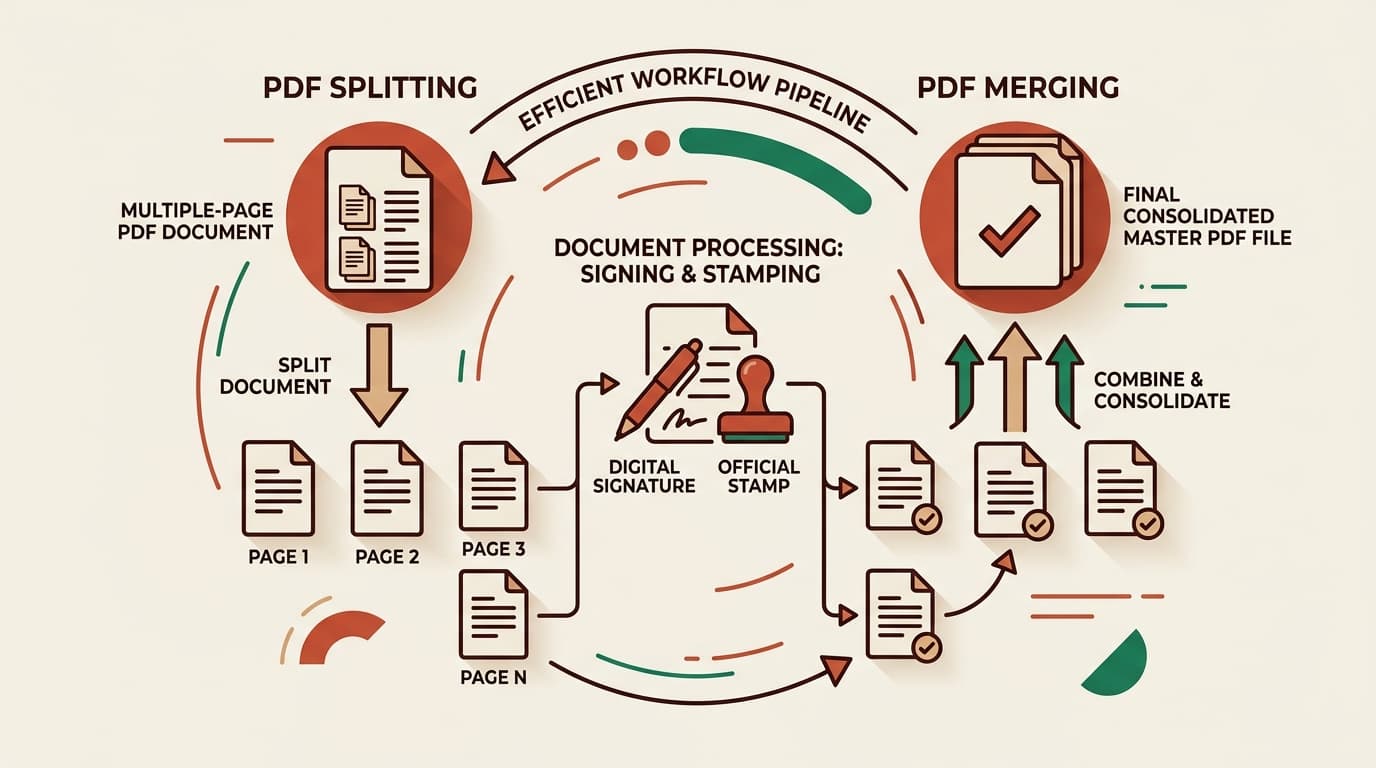
Core differences: Disaggregation vs. Aggregation
At a technical level within the PDF specification (ISO 32000), these two operations perform inverse mutations on document object trees:
Extracting & Isolating
Takes 1 parent document and parses its page tree object to generate 2 or more autonomous PDF binaries. Essential for redaction, privacy isolation, chapter dividing, and meeting upload size thresholds.
Explore PDF splitting modes →Combining & Unifying
Ingests multiple standalone PDF files, unifies their object streams, deduplicates font dictionaries, and compiles one single sequential master document.
Explore PDF merge tool →Feature & use-case comparison matrix
| Operation | Primary Inputs | Resulting Output | Primary Business Objective |
|---|---|---|---|
| Split PDF | 1 monolithic document | Multiple targeted PDFs / ZIP | Security isolation, page excision, meeting file size caps |
| Merge PDF | 2+ separate PDF files | 1 consolidated master file | Executive presentation, single-file filing, invoice batching |
| Page Cutter | 1 document with blanks | 1 trimmed clean PDF | Striking out blank duplex pages and outdated disclaimers |
Real-world enterprise case studies (Legal, HR, Tax)
Examining real business workflows illustrates why proficiency in both tools is critical:
Case 1: Legal Litigation & Court Trial Bundles
Attorneys receive 500-page discovery records from opposing counsel. They first split out Exhibit B and Exhibit F for witness deposition. After annotating each exhibit with exhibit numbers, counsel merges all marked exhibits alongside the notice of motion into a single indexed electronic court filing.
Case 2: HR Employee Onboarding & KYC Dossiers
An HR department scans 20 employee onboarding sheets in one bulk feeder pass. Using our all-pages splitter, they separate each employee form into individual files. Then, for each employee, they merge their specific signed offer letter, Aadhaar scan, and PAN card into an individual personnel file.
The circular pipeline: Split → Sign/Redact → Merge back
The most common everyday productivity pattern is the Circular PDF Pipeline:
Split & Isolate
Extract only page 14 (the signature sheet) from a 50-page master vendor agreement.
Execute Locally
Sign, date, or stamp page 14 using your tablet stylus or desktop PDF viewer.
Merge Back Together
Re-stitch pages 1–13, your newly signed page 14, and pages 15–50 into the final executed master contract.
Common pitfalls to avoid during split and merge operations
- Mismatched page dimensions: When merging US Letter (8.5 × 11 in) and ISO A4 (210 × 297 mm) files, ensure the viewer settings respect independent page geometry.
- Duplicate font subsets: Poor merge tools duplicate font subsets, inflating file size. Modern client-side tools cleanly streamline dictionary resources.
- Cloud privacy exposure: Never upload confidential contracts to unvetted cloud converters. Always process locally in your browser.
Written by the pdfsplitter.in Security & Engineering Team
Specialists in client-side WebAssembly cryptography, browser document sandboxing, and zero-trust web architectures.
Frequently asked questions
Related Guides & Tutorials
How to Split a PDF File: The Complete Guide
Every way to split a PDF explained — by page range, into separate single-page files, in half, or by size.
How to Split PDFs Without Adobe Acrobat
Free desktop and in-browser methods to split pages without recurring software subscriptions.
Need to combine or separate PDF files today?
Process unlimited documents directly in your browser. 100% private and free.